Note
Go to the end to download the full example code.
(extra) K-points with wulfric
Tutorial tasks
Get kpoints for future dispersion calculations with wulfric.
(extra) Visualize Brillouin zone, k-points and k-path with
wulfric.PlotlyEngine.(extra) Create a crystal on FCC lattice with wulfric. Visualize and compare primitive and conventional cells. Compute k-points, k-path. Compare reciprocal cell of conventional cell, reciprocal cell of primitive cell and
wulfric.Kpoints.rcell.
One way to get a set of k-points and a k-path in reciprocal space is to use wulfric package.
We recommend to use its wulfric.Kpoints interface. Here we provide
not the most straightforward way to interact with it, but the one that gives access
to symmetry information. Note that symmetry search in wulfric is powered by spglib.
Wulfric operates on the crystal structure. First, get the information from spglib via wulfric's interface to it.
import wulfric
import magnopy

spinham = magnopy.examples.cubic_ferro_nn(S=1)

spglib_data = wulfric.get_spglib_data(
    cell=spinham.cell,
    atoms=spinham.atoms,
)
Next, display the information about the space group or Bravais lattice type
print(spglib_data.space_group_number)
print(spglib_data.crystal_family + spglib_data.centring_type)
221
cP
Now you can create an instance of wulfric.Kpoints class with one of
the implemented conventions in wulfric for the automatic choice of the high-symmetry
points and k-path.
kp_sc = wulfric.Kpoints.from_crystal(
    cell=spinham.cell,
    atoms=spinham.atoms,
    spglib_data=spglib_data,
    convention="SC",
)

kp_hpkot = wulfric.Kpoints.from_crystal(
    cell=spinham.cell,
    atoms=spinham.atoms,
    spglib_data=spglib_data,
    convention="HPKOT",
)

# magnopy.PlotlyEngine() can be used as well
pe = wulfric.PlotlyEngine(_sphinx_gallery_fix=True)

pe.plot_cell(
    cell=wulfric.cell.get_reciprocal(spinham.cell), legend_label="Reciprocal cell"
)

pe.plot_kpath(kp_sc, legend_label="K-path (SC)", color="GoldenRod", legend_group="SC")
pe.plot_kpoints(
    kp_sc, color="DarkBlue", legend_label="K-points (SC)", legend_group="SC"
)

pe.plot_kpath(
    kp_hpkot, legend_label="K-path (HPKOT)", color="ForestGreen", legend_group="HPKOT"
)
pe.plot_kpoints(
    kp_sc, color="Black", legend_label="K-points (HPKOT)", legend_group="HPKOT"
)

pe.show(axes_visible=False)
Default convention is HPKOT
kp = wulfric.Kpoints.from_crystal(
    cell=spinham.cell,
    atoms=spinham.atoms,
    spglib_data=spglib_data,
)
The objects above provide a simple interface
For calculations (
wulfric.Kpoints.points())
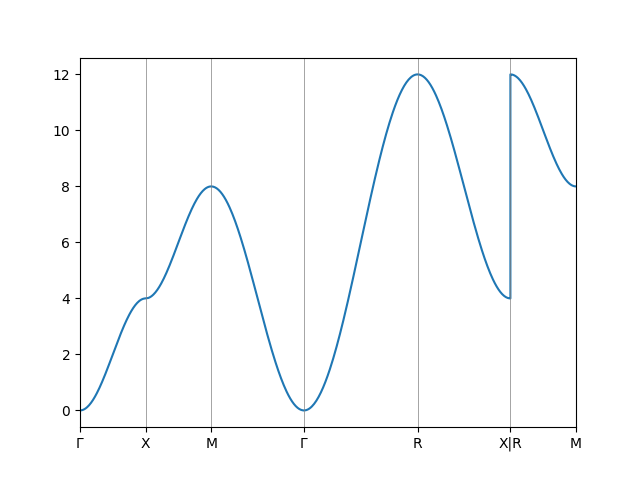
lswt = magnopy.LSWT(spinham, spin_directions=[[0, 0, 1]])
omegas = [lswt.omega(k=kpoint)[0].real for kpoint in kp.points()]
And for plotting
import matplotlib.pyplot as plt

_, ax = plt.subplots()

ax.plot(kp.flat_points(), omegas)

ax.set_xticks(kp.ticks(), kp.labels)
ax.vlines(kp.ticks(), 0, 1, transform=ax.get_xaxis_transform(), color="grey", lw=0.5)
ax.set_xlim(kp.ticks()[0], kp.ticks()[-1])

plt.show()
Total running time of the script: (0 minutes 1.392 seconds)